Best digital signage software for churches
Visionect, 28 Aug 2025
Modern churches are blending tradition and technology, whether it’s sharing service schedules, welcoming newcomers, or promoting events. Behind every great display lies digital signage software, and choosing the right CMS (content management system) matters just as much as the hardware.
This guide helps you explore the best software options for church signage, what to look out for, and practical tips to keep your space cohesive and energy-efficient.
Why is digital signage software important for churches?
Digital signage isn’t just a screen — it’s about how you manage your messages. The right CMS lets you:
- Update content easily and remotely, especially helpful for volunteers
- Match your church’s tone and branding, from fonts to color palettes
- Save on printing and reduce clutter, making communication cleaner
- Unify messaging across multiple displays — e.g., welcome signs, room schedules
What should churches look for in digital signage software?
When selecting digital signage software for your church, look for these must-have features:
- Simple interface. Easy enough for volunteers to use.
- Remote control & real-time updates. Flexible and efficient.
- Supports e-paper and LED/LCD. Future-proofs your setup.
- Energy-saving features. Ideal for churches that value sustainability and versatility.
- Brand consistency. Keeps graphics and fonts aligned with your values.
- Scalable deployment. From one foyer to multiple rooms or campuses.
Which digital signage software is the best for churches?
Here’s how some popular platforms stack up:
| CMS Option | Why It Could Work | Church Limitations |
|---|---|---|
| ScreenCloud | Cloud-based with remote content updatesLarge template library, including event and announcement layoutsIntegrates with Google Slides, YouTube, and other familiar tools | Feels corporate; may require customization for church-specific branding |
| NoviSign | Cloud-based content management with remote schedulingSupports interactive content like touchscreens for visitor infoWide range of pre-built templates for events and notices | More enterprise-oriented; interface may feel complex for smaller volunteer teams |
| Yodeck | Affordable, cloud-native platform with easy remote updatesPlaylist and scheduling features for rotating service times and announcementsWorks offline once content is loaded, useful for areas with unreliable internet | Requires media player setup, adding to hardware needs |
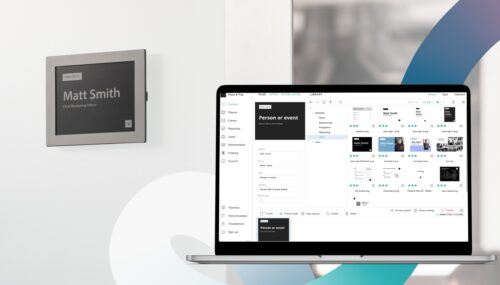
| Place & Play | Works with both e-paper and LED/LCD displaysLow energy features, ideal for always-on church info boardsCloud-based updates via Visionect CMS, no extra media player required | Optimized for e-paper, which may limit certain multimedia formats |
Place & Play stands out because it fits in both quiet and high-traffic church areas, without sacrificing design or energy efficiency.
2025 signage software trends that matter
Keeping up with industry trends helps future-proof your investment:
- E-paper is rising, especially in places like churches where subtlety matters.
- AI and personalized content are becoming more accessible — even for non-commercial settings.
- Cloud-based CMS with modular add-ons offers flexibility for evolving needs.
Though immersive features like AR or touchless kiosks aren’t essential for every church, knowing these are on the horizon ensures your system can evolve over time.
What are the best practices for digital signage?
To make your digital signage software work best in your environment:
- Keep visuals clean and readable. Avoid clutter.
- Use consistent branding. Fonts, colors, tone match church materials.
- Plan content ahead. Set up weekly or seasonal schedules in advance.
- Visuals for accessibility. Use large font, high contrast, legible layouts.
- Zone-based hosting. Use e-paper for quiet corners, bright displays for lobbies.
- Energy management. Automate sleep/dim modes for off-hours.
What’s the best content for church digital signage?
Your church’s CMS makes it easy to schedule and tailor media for each display. But the key to effectiveness is choosing the right type of content for the right screen size. Here’s how different sizes shine in a ministry setting:
6″ screen: Personal engagement
Ideal for: Church app, volunteer tablets, welcome team touchscreen content ideas:
- Daily Bible verse notifications
- Small-group meeting reminders
- Volunteer schedules and service notes
Why it works: On-the-go content feels personal. The CMS can automate mobile pushes so your volunteers, leaders, and congregants stay informed wherever they are.
13″ screen: Ministry & team coordination
Ideal for: Ministry workstations, welcome desks, children’s check-in
Content ideas:
- Rotating announcements for upcoming events
- Check-in instructions for kids and parents
- Song lyrics or sermon notes for small group rooms
Why it works: A mid-sized display is easy to read up close but still portable. Your CMS can schedule event reminders or check-in instructions to appear exactly when they’re needed.
32″ screen: Big impact in public spaces
Ideal for: Lobby displays, fellowship hall TVs, sanctuary wall monitors
Content ideas:
- Pre-service countdown timers with worship music
- Event highlight videos
- Mission trip photo slideshows and testimonies
Why it works: A large display grabs attention in high-traffic areas. The CMS can schedule content to match the church calendar. For example, pushing upcoming sermon series graphics before and after services.
Can digital signage support both worship and community life?
When planned thoughtfully, signage can enrich both the spiritual and social aspects of church life. During services, the display can display hymns, responsive readings, or sermon notes. Throughout the week, it can promote outreach events, volunteer opportunities, or devotional messages.
Why Place & Play is a smart fit for your space
The Place & Play CMS makes for a thoughtful investment in church communication:
- Tailored for e-paper, so displays won’t glow or distract during quiet moments
- Adaptable to both e-paper and traditional screens, so you don’t need multiple systems
- Easy remote updates, perfect for volunteer-led teams
- Designed for low energy use, aligning with eco-conscious values
Whether it’s an entryway bulletin or a hallway announcement board, Place & Play scales with your church’s needs.
Ready to enhance communication in your congregation?
Choosing digital signage software for your church means blending purpose and peace. Aim for options that are easy to use, flexible, energy-conscious, and respectful of the worship environment. In many contexts, Place & Play hits that balance beautifully — quiet where it needs to be, powerful where it counts.
CHAT WITH A VISIONECT TEAM MEMBER TODAYTags